
Try this workflow
- Build the newsletter destination with campaign tags.
- Create a short URL and check the redirect.
- Sign in to manage your links and open their analytics.
Follow the complete campaign example with a weekly reporting worksheet.
Next: compare email, social, and QR placements
Create one measurable campaign link
Start with a complete destination such as https://example.com/demo?utm_source=newsletter&utm_medium=email&utm_campaign=autumn-demo. Use the free URL Shortener to try the redirect flow, or sign in and create the link in Dashboard → Links so you can manage it in your account.
Copy the short URL returned by ShortIQ. Open it yourself and confirm that the destination and campaign parameters survive the redirect. Only then put it in your newsletter button.
Read the analytics for that link
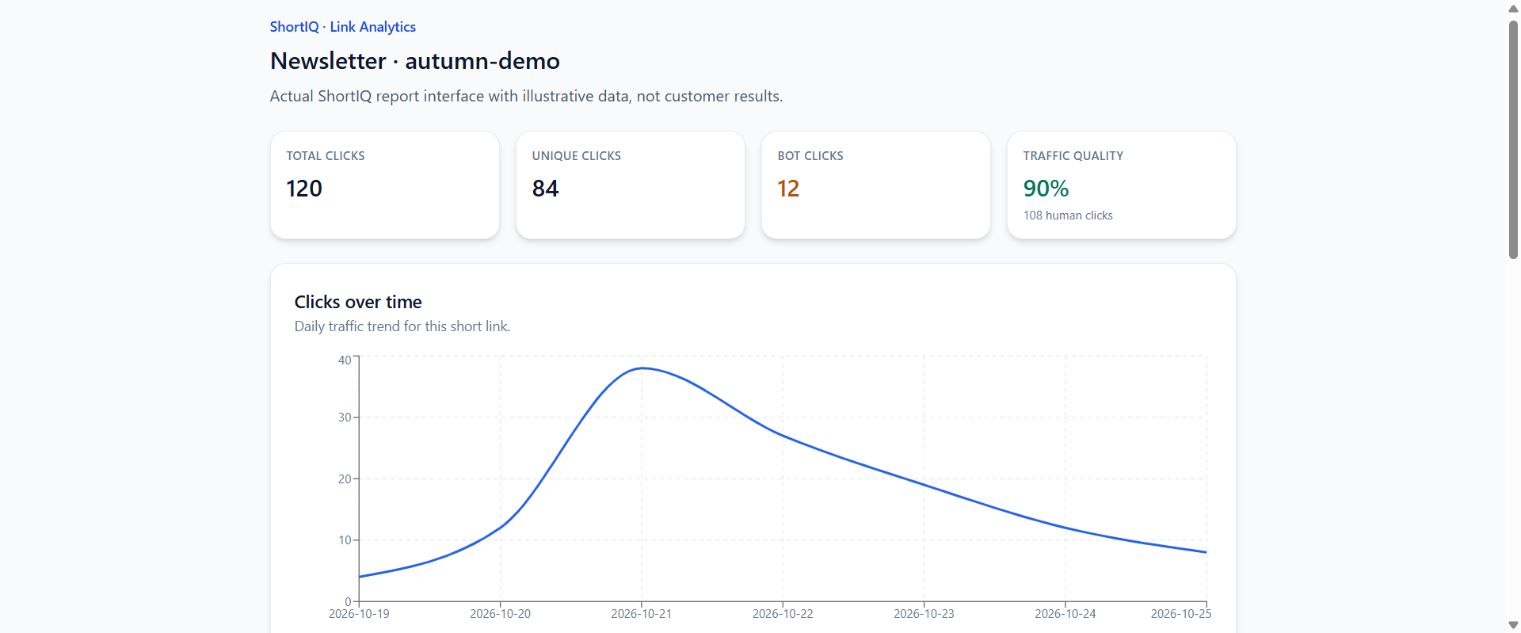
Open the link analytics from Dashboard → Links and choose the reporting range. The link report includes total, human, bot, and unique clicks, an activity chart, and country, device, referrer, and UTM breakdowns.
Use the activity chart to locate the send-time response. Check human and bot counts before interpreting the total. An email preview or automated scanner can request a URL without becoming a customer.
Understand what the numbers mean
Total clicks count recorded requests through the short URL. Unique clicks use distinct recorded IP addresses, so shared networks, changing addresses, and bots can affect the number. Human and bot labels depend on detection rather than proof of who clicked.
ShortIQ cannot infer a purchase or form submission on your destination from a redirect alone. Measure those actions in your website analytics or CRM. Referrers may be absent and country information may be unknown; neither means the redirect failed.
Choose a direct link or a shortened link
Use a direct tagged destination if your website analytics already answers your reporting question and you do not need redirect-level counts. Use a ShortIQ link when you also need a compact shareable URL and a separate record of visits before the destination loads.
For two placements, create two links and keep a short campaign note mapping each URL to its placement. The Link Tracking Software guide explains that comparison workflow.
ShortIQ vs Basic URL Shortener
| Capability | ShortIQ | Basic URL Shortener |
|---|---|---|
| Analytics context | Country, device, browser, referrer, traffic quality, and UTM visibility | Usually top-line click counting |
| Campaign workflow | Connected UTM builder and short-link workflow | Shorten first, structure later |
| Operational clarity | Built for marketers and SaaS teams using repeatable campaigns | Better suited for one-off links |
| Reporting readiness | Designed for decision-making and attribution review | Often requires spreadsheet cleanup |
| Upgrade model | Free-first with manual expansion | Commonly tier-first subscriptions |
Frequently Asked Questions
What is a URL shortener with analytics?
It is a short-link platform that not only redirects traffic but also records useful engagement data such as clicks, traffic sources, devices, countries, and trend performance.
Why does analytics matter in a shortener?
Analytics makes links useful for campaign decisions. Without analytics, a short link is mainly cosmetic. With analytics, it becomes part of your attribution system.
Is ShortIQ only for SaaS companies?
No. It is especially well suited for SaaS teams, but agencies, consultants, and performance marketers can use the same workflow.
Can ShortIQ help with UTM tracking too?
Yes. ShortIQ includes a UTM builder workflow so teams can create cleaner campaign URLs before shortening and sharing them.
How should I test a URL shortener with analytics?
Run a real campaign, then compare setup speed, analytics depth, and reporting clarity across your shortlisted tools.
Related ShortIQ Resources
Create Smarter Links With Real Analytics
Start free with ShortIQ and test a real campaign workflow that combines short links, UTM governance, and decision-ready reporting.
Start Free